The Unique Identification Authority of India (UIDAI) is a statutory authority established by the Government of India in the year 2009 under the Ministry of Electronics and Information Technology (MeitY).
UIDAI is responsible for the implementation and management of the Aadhaar programme, which provides a unique 12-digit identification number to residents of India based on demographic and biometric information.
Aadhaar Services
Access comprehensive Aadhaar services online. Update details, Aadhaar card download, track status, etc.
Download e-AadhaarMy Aadhaar Login
My Aadhaar Login is an official online service provided by UIDAI that allows residents to access their Aadhaar-related services through a single dashboard. By logging in to the My Aadhaar portal, users can download Aadhaar, update details, check status, order PVC card, and access many other services securely.
Login Process (MyAadhaar Portal):
- Open My Aadhaar Login Page: Visit the official My Aadhaar portal,
- Click on the “Login” or “My Aadhaar” option available on the homepage.
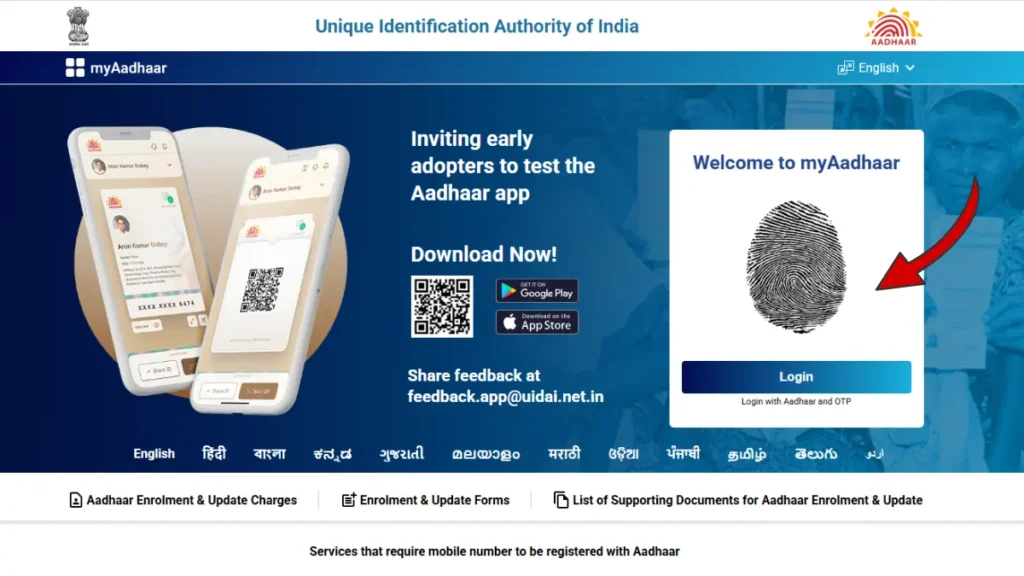
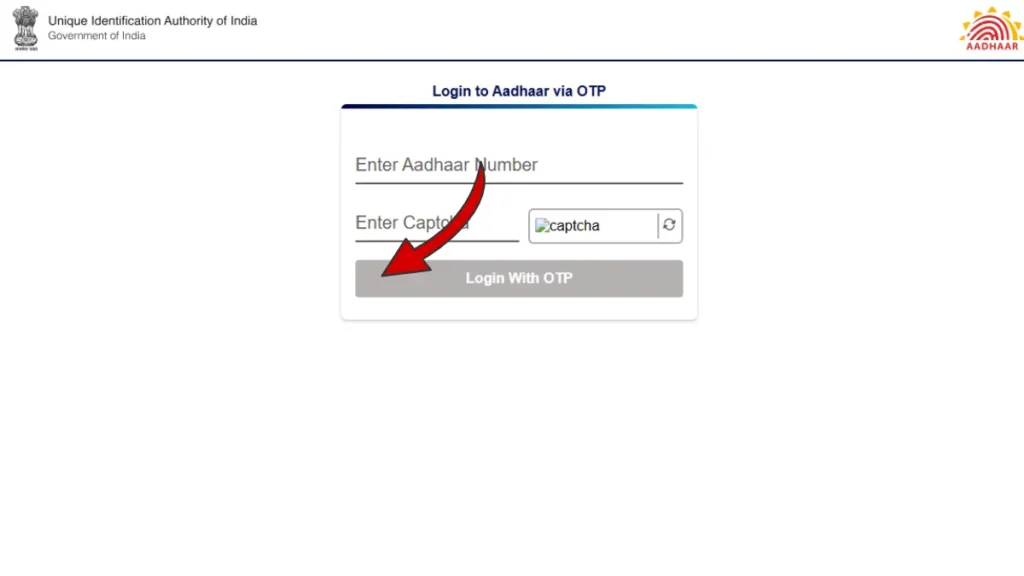
- Enter Aadhaar / VID Details
- Enter your 12-digit Aadhaar Number (UID)
- OR
- Enter your 16-digit Virtual ID (VID)
- Enter the captcha code shown on the screen.
- Click on Send OTP.
- OTP Verification
- An OTP will be sent to your registered mobile number.
- Enter the OTP in the given field.
- Click on Login to access your dashboard.
Aadhaar Services Offered by UIDAI
The Unique Identification Authority of India (UIDAI) offers a wide range of Aadhaar-related services to help residents enrol, update, retrieve, and manage their Aadhaar details easily and securely. These services are available online through the official UIDAI portals as well as offline at authorised Aadhaar enrolment centres.
Below is a complete step-by-step overview of the major Aadhaar services provided by UIDAI:
Download Aadhar card (e-Aadhaar)
Download a secure digital copy of your Aadhaar card for use in various services. The e-Aadhaar is a password-protected, digitally signed PDF issued by UIDAI and is valid for all purposes.
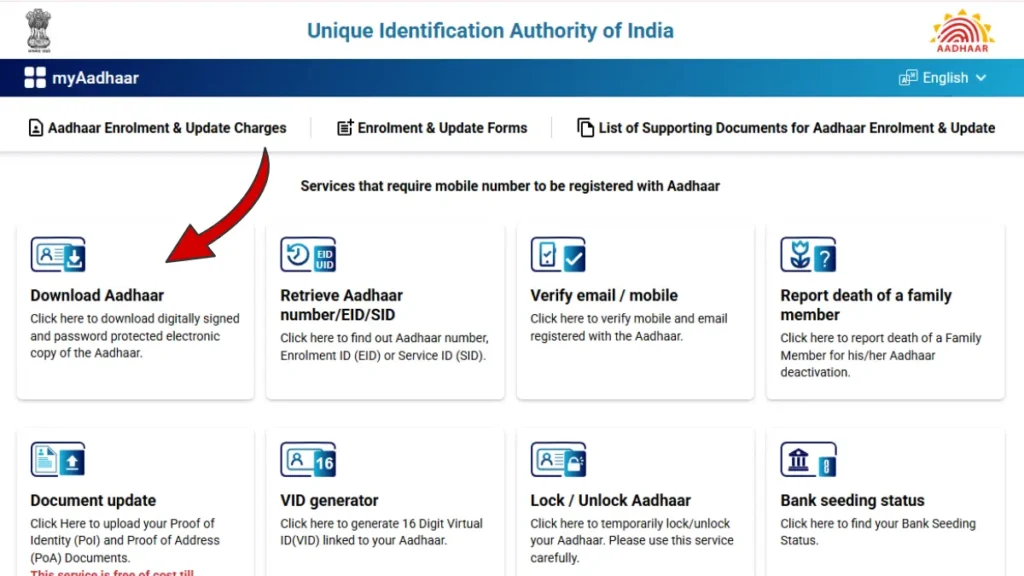
- Open the Aadhaar Download Page: Visit the official My Aadhaar portal. On the homepage, click on the “Download Aadhaar” option under Aadhaar Services.
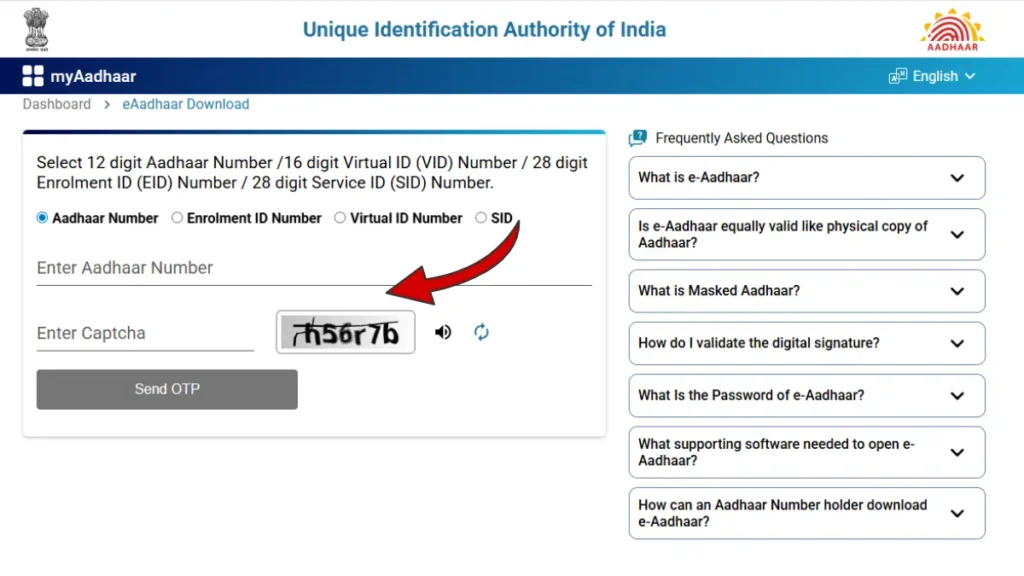
- Enter Your Details
- Enter your Aadhaar Number (UID), OR, Enrolment ID (EID) OR, Virtual ID (VID)
- Enter the captcha code shown on the screen.
- Click on Send OTP.
- OTP Authentication
- An OTP will be sent to your registered mobile number.
- Enter the received OTP in the given field.
- Click on Verify & Download.
- Download e-Aadhaar PDF
- After successful verification, your e-Aadhaar PDF file will be downloaded.
- The file is password protected for security.
- Password to Open Aadhaar PDF
- The password to open your Aadhaar PDF is:, First 4 letters of your name (IN CAPITAL LETTERS), Followed by your year of birth (YYYY)
- If your name is VISHNU PRASAD and your year of birth is 2004, the password will be VISH2004
Retrieve Aadhaar Number / EID / SID
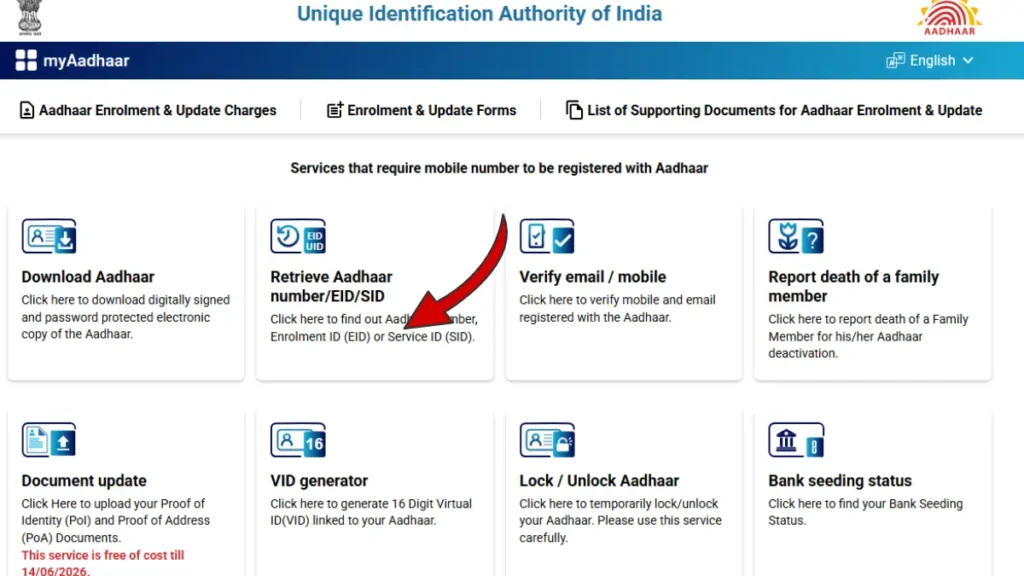
Find your Aadhaar number, Enrolment ID (EID), or Service ID (SID) if you have forgotten or misplaced it.
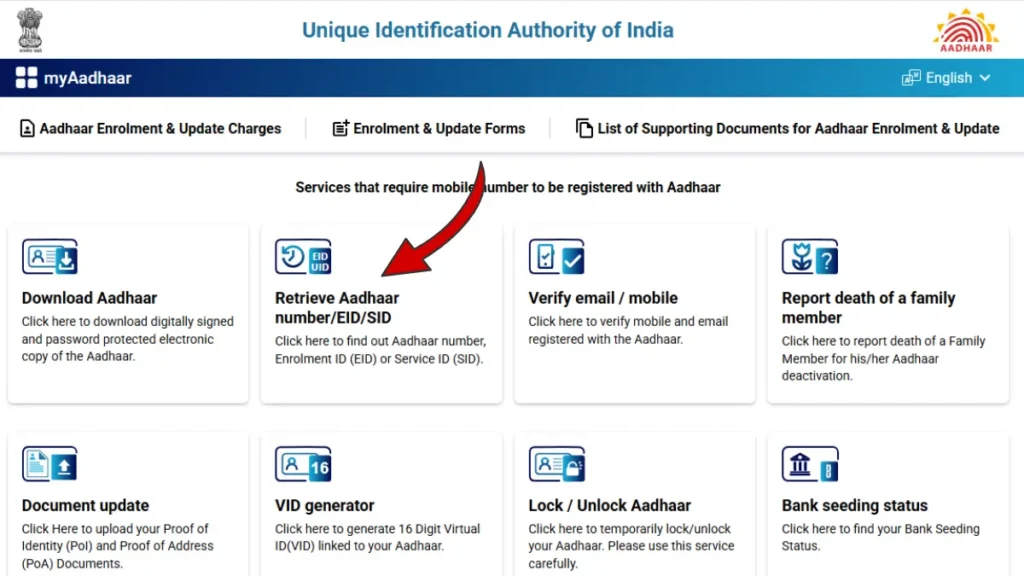
- Steps to Retrieve Aadhaar Number or EID
- Visit https://myaadhaar.uidai.gov.in/
- Click on Retrieve Aadhaar Number / EID
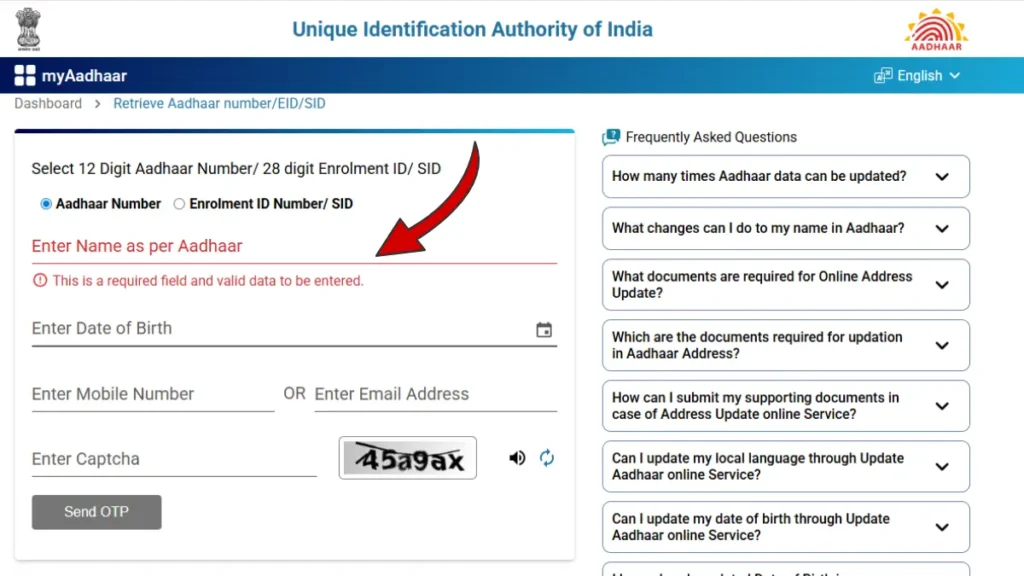
- Enter your name, registered mobile number, and captcha
- Choose whether you want to retrieve Aadhaar Number or EID
- Verify OTP sent to your mobile
- Aadhaar number/EID will be sent via SMS
Verify Email / Mobile Number with Aadhaar
The Verify Email / Mobile Number with Aadhaar service is an official online facility provided by UIDAI (Unique Identification Authority of India). This service helps Aadhaar holders confirm whether their mobile number or email ID is correctly linked with their Aadhaar number, which is essential for accessing various Aadhaar-related online services.
Steps to Verify Email / Mobile with Aadhaar
- Visit the official UIDAI website: 👉 https://myaadhaar.uidai.gov.in/
- Click on Verify Email / Mobile.
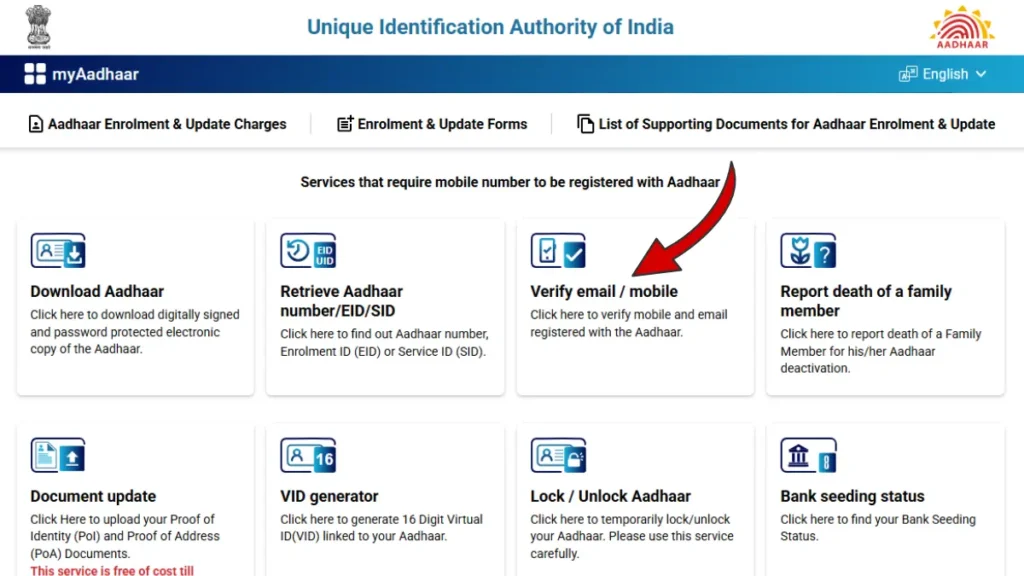
- Enter your 12-digit Aadhaar number.
- Select Mobile Number or Email Address for verification.
- Enter the registered mobile number or email ID.
- Enter the captcha code and click Send OTP.
- Enter the OTP received and click Submit.
Once verified, a confirmation message will appear on the screen , ✔️ This service is free and available only on the official UIDAI portal.
Check Enrolment or Update Status
The Check Enrolment or Update Status service by UIDAI allows residents to track the status of their Aadhaar enrolment or Aadhaar update request online using the Enrolment ID (EID) or Service Request Number (SRN).
How to Check Aadhaar Enrolment / Update Status Online
- Visit 👉 https://myaadhaar.uidai.gov.in/ and click on Check Enrolment & Update Status option.
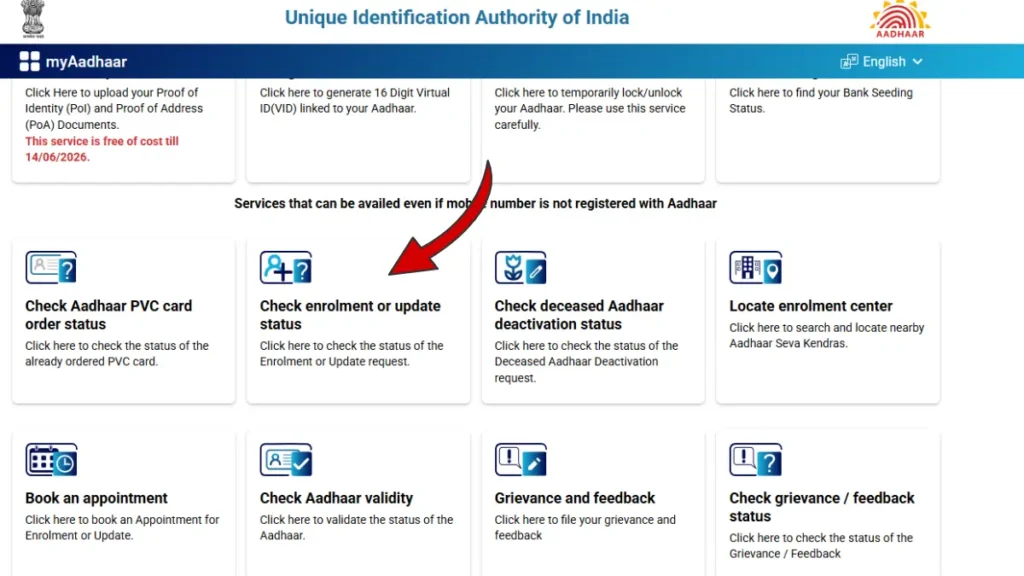
Enter EID or URN
- Enter your Update Request Number (URN) or Enrolment ID (EID).
- Enter the captcha code displayed on the screen.
- Authenticate the request using OTP sent to your registered mobile number.
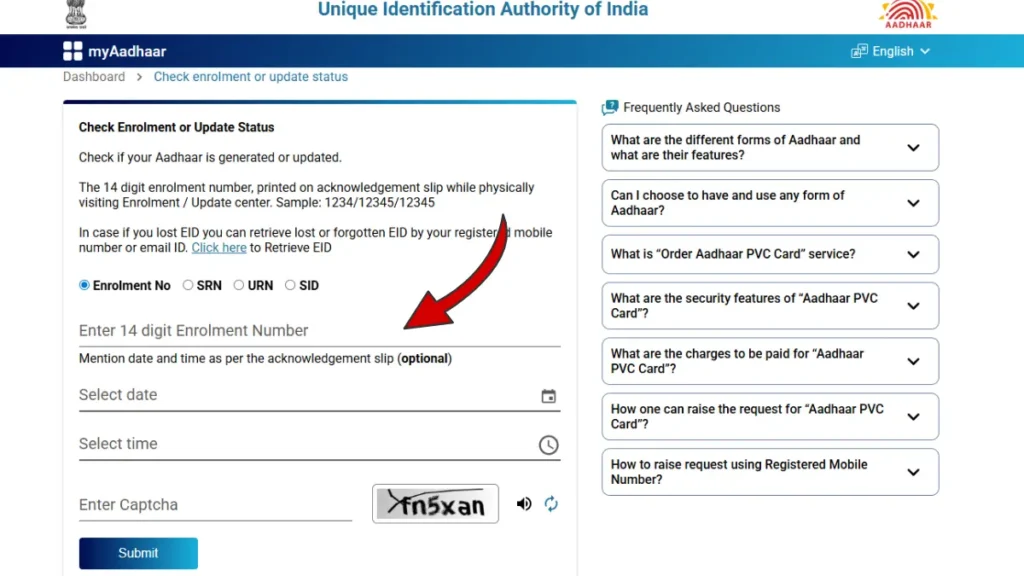
Check Aadhaar Status
- Click on Submit.
- The portal will display your Aadhaar status such as Under Processing, Aadhaar Generated, or Update Completed.
My Aadhaar update – Aadhaar Document Update Online (PoI & PoA)
The Aadhaar Document Update service provided by UIDAI allows residents to update or re-submit Proof of Identity (PoI) and Proof of Address (PoA) documents online. This service is useful when Aadhaar details need verification or correction as per UIDAI guidelines.
👉 Aadhaar document update is FREE of cost till 14 June 2026.
How to Update Aadhaar Documents Online
- Visit 👉 https://myaadhaar.uidai.gov.in/,
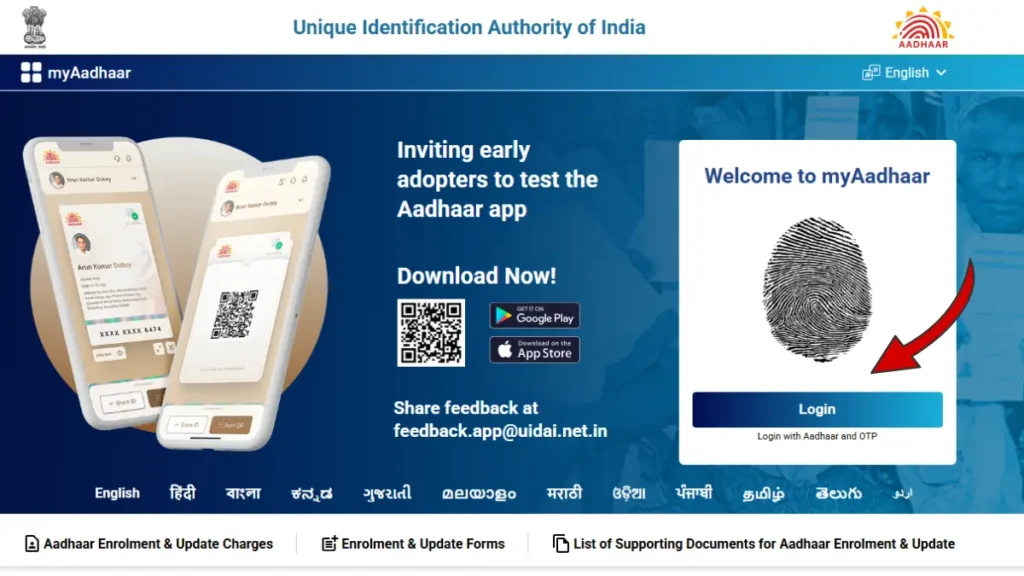
- Login using Aadhaar number and OTP
- Select Document Update
- Upload valid PoI / PoA documents
- Submit and note the SRN number
Aadhaar Update – Important Information, Documents & Fees
NOTE: Mobile number update can only be done at an Aadhaar Enrolment Centre. Biometric authentication is mandatory. No document or old mobile number is required.
Documents Required for Aadhaar Update:- Accepted Documents for Different Aadhaar Updates
| Update Type | Document Category | Accepted Documents (Examples) |
| Name Correction / Change | PoI – Proof of Identity | Passport, PAN Card, Voter ID, Driving Licence, Government Photo ID, Ration Card, Bank Passbook, Pensioner Card |
| Address Update | PoA – Proof of Address | Passport, Bank/Post Office Passbook, Voter ID, Driving Licence, Electricity/Water/Gas Bill, Telephone/Broadband Bill, Registered Rent Agreement, Insurance Policy, Property Tax Receipt |
| Date of Birth Update | Proof of DOB | Birth Certificate, Passport, PAN Card, School Leaving Certificate, SSLC Certificate, Marksheet from recognized board |
| Relationship Update (C/o, S/o, W/o, D/o) | PoR – Proof of Relationship | Birth Certificate, Marriage Certificate, Passport (family details), Ration Card, MNREGA Job Card, Government-issued Family Certificate |
| Mobile Number Update | OTP + Biometric Verification | No document required (verified at Aadhaar centre) |
| Email ID Update | OTP Verification | No document required |
| Photograph Update | Captured at Centre | New photograph taken at Aadhaar enrolment centre |
| Biometric Update (Fingerprint / Iris) | Captured at Centre | Biometric details captured at Aadhaar enrolment centre |
Aadhaar Update Fees (As per UIDAI Guidelines)
| Service Type | Fee Charged |
| Demographic Update (Name, Address, DOB, Gender, Mobile, Email) | ₹75 |
| Proof of Identity / Address Document Update | ₹75 |
| Biometric Update (Fingerprint, Iris Scan, Photograph) | ₹125 |
| Demographic + Biometric Update Together | ₹125 |
| Mandatory Biometric Update for Children (Age 5–7 & 15–17) | Free of Cost |
After submitting an Aadhaar update request, UIDAI usually takes 7 to 30 days to process and approve the changes. In many cases, minor updates without any document issues are completed faster, typically within 10 to 15 days. However, if the update requires additional document verification, the processing time may take longer. Applicants are advised to regularly check the update status using their URN or SRN on the official UIDAI website.
Generate Virtual ID (VID)
The Virtual ID (VID) is a 16-digit temporary number issued by UIDAI that can be used instead of your Aadhaar number to protect your privacy. You can easily generate or retrieve VID online through the official MyAadhaar portal.
Steps to Generate Virtual ID Online
- Visit 👉 https://myaadhaar.uidai.gov.in/ and click on Generate / Retrieve VID.
- Enter your 12-digit Aadhaar number.
- Enter the captcha code shown on the screen.
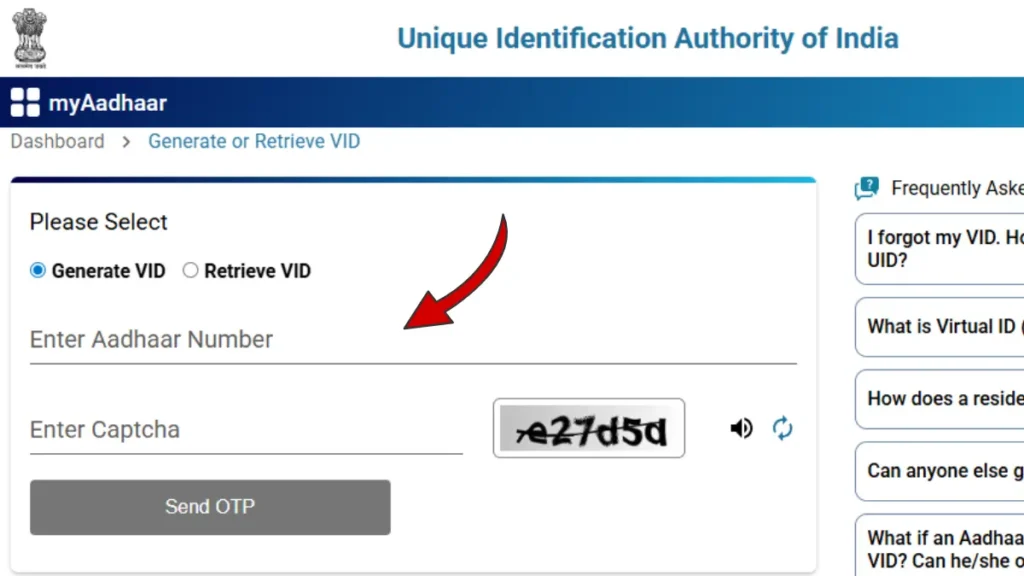
- Authenticate using OTP sent to your registered mobile number.
- Your Virtual ID (VID) will be generated and displayed.
✔️ Virtual ID generation is available only on the official UIDAI portal.
Lock / Unlock Aadhaar
The Lock / Unlock Aadhaar service by UIDAI allows you to temporarily lock your Aadhaar number to prevent unauthorized use. You can unlock it anytime whenever Aadhaar authentication is required.
- Visit 👉 https://myaadhaar.uidai.gov.in/, Click on Lock / Unlock Aadhaar option
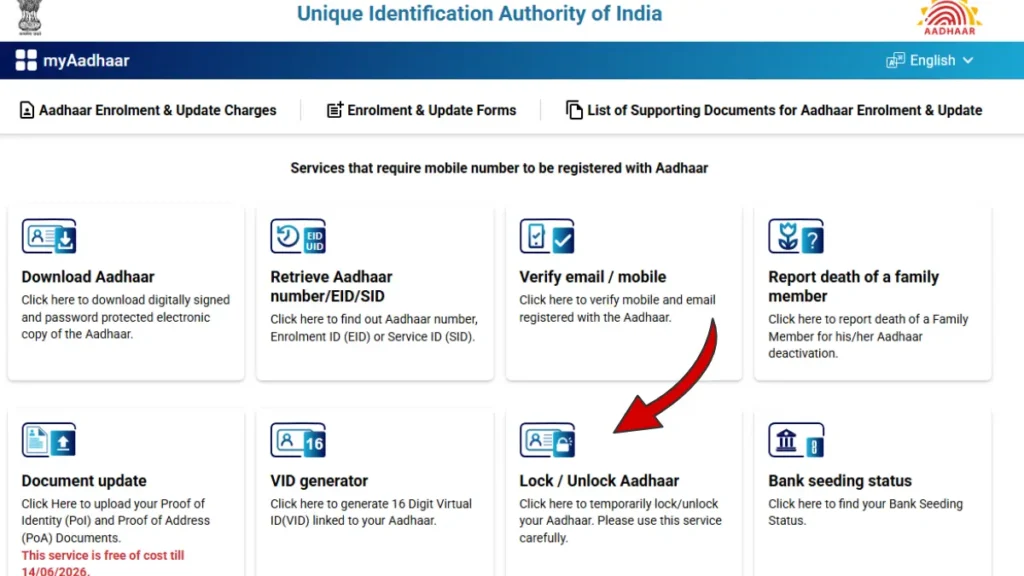
- Enter your 12-digit Aadhaar number
- Enter captcha and authenticate via OTP
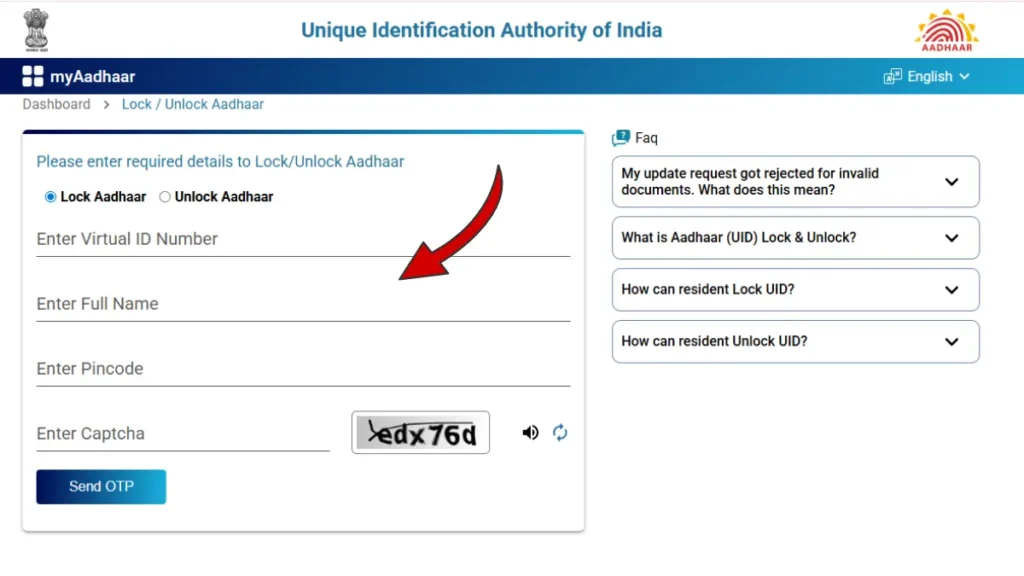
- Choose Lock or Unlock Aadhaar and submit
✔️ This service is free, secure, and available only on the official UIDAI portal.
Order Aadhaar PVC Card
The Aadhaar PVC Card is a durable, wallet-friendly Aadhaar card issued by UIDAI with enhanced security features like QR code, hologram, micro text, and ghost image. You can easily order it online from the official UIDAI website.
- First, visit the official UIDAI website: https://myaadhaar.uidai.gov.in/
- Login using your Aadhaar number and select the “Order Aadhaar PVC Card” option from the dashboard.
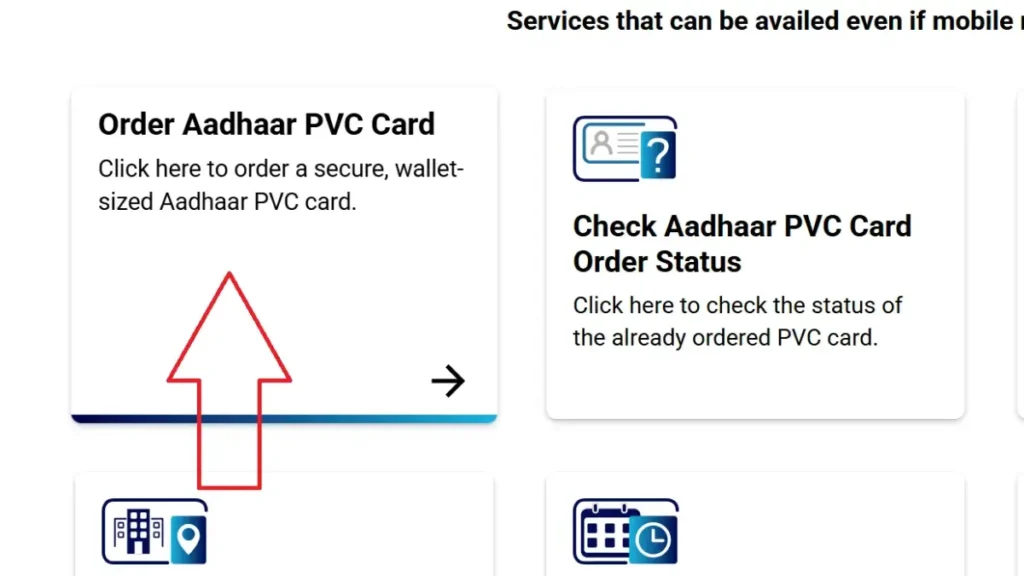
- On the next page, select one option from the following:
- Aadhaar Number (12 digits)
- Enrollment ID (28 digits)
- Enter the selected number and fill in the captcha code for verification.
- If your mobile number is not registered with Aadhaar, select the option “My mobile number is not registered” and enter an alternate mobile number.
- Click on Send OTP and enter the OTP received on your mobile number to verify your request.
- After OTP verification, proceed to pay the nominal fee of ₹50, which includes GST and Speed Post delivery charges.
- Once the payment is successful, your request will be submitted. The Aadhaar PVC Card will be delivered to your registered address through Speed Post.
How to Check Aadhaar PVC Card Order Status Online
If you have already applied for an Aadhaar PVC Card, you can easily track the status of your request online through the UIDAI portal.
- Go to myaadhaar.uidai.gov.in and open the “My Aadhaar” section.
- From the available services, click on “Check Aadhaar PVC Card Order Status.”
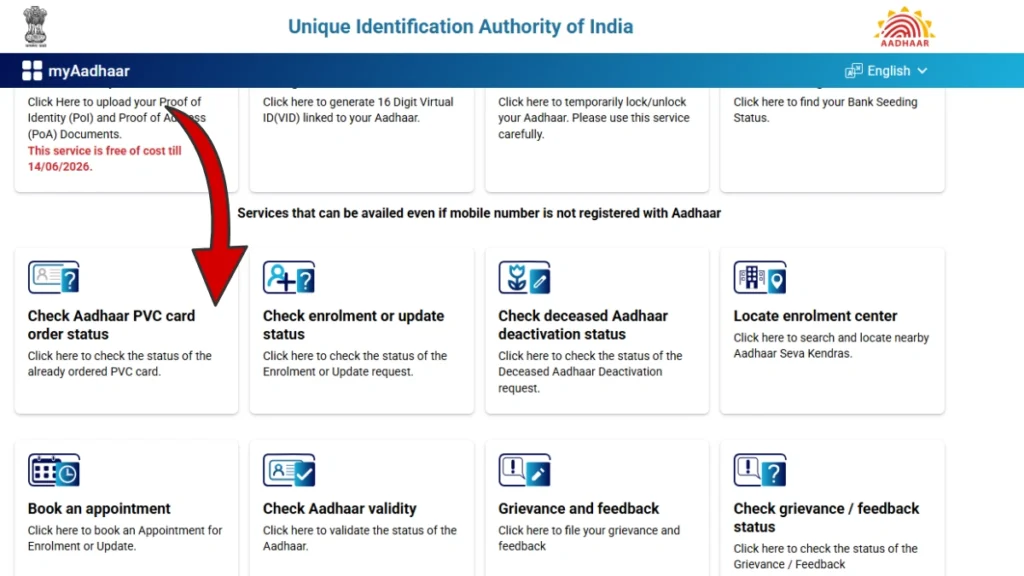
- On the status check page, enter the following information:
- Your 28-digit Service Request Number (SRN) received after payment
- The captcha code displayed on the screen
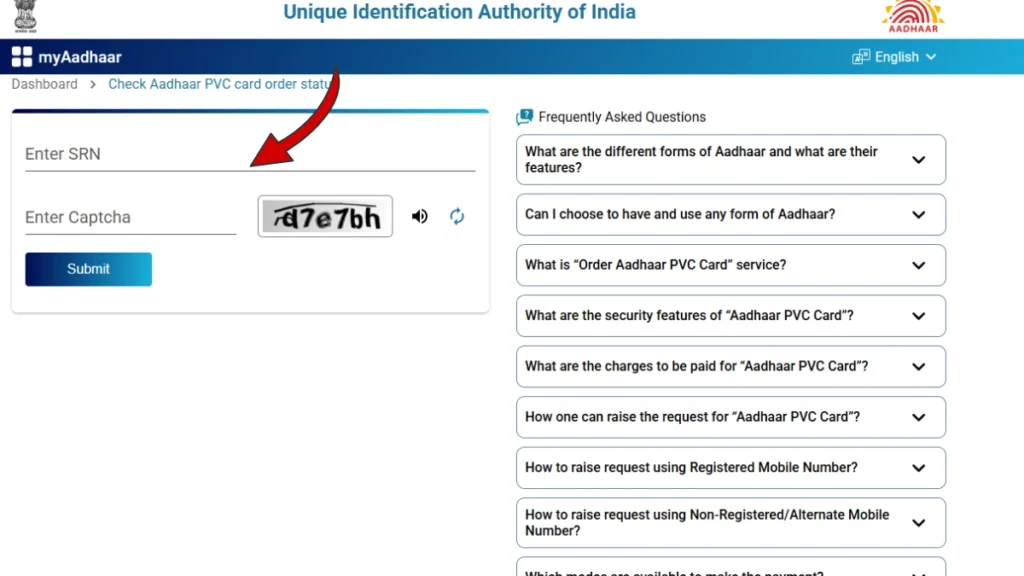
- After entering the details, click on the Submit button.
- You will be able to see the current status of your Aadhaar PVC Card, such as:
- Order Processed
- Handed Over to Department of Post (DoP)
- Delivered
Delivery Timeline
Once the order is placed, UIDAI generally dispatches the Aadhaar PVC Card to India Post within 5 working days (excluding the date of request).
The card is usually delivered to your registered address within 5 to 15 working days via Speed Post.
Locate Aadhaar Enrollment Center Online
Find nearby Aadhaar Seva Kendras for Aadhaar enrollment or update services.
- Visit https://myaadhaar.uidai.gov.in/ and click on the Locate Enrollment Center option from the My Aadhaar section.
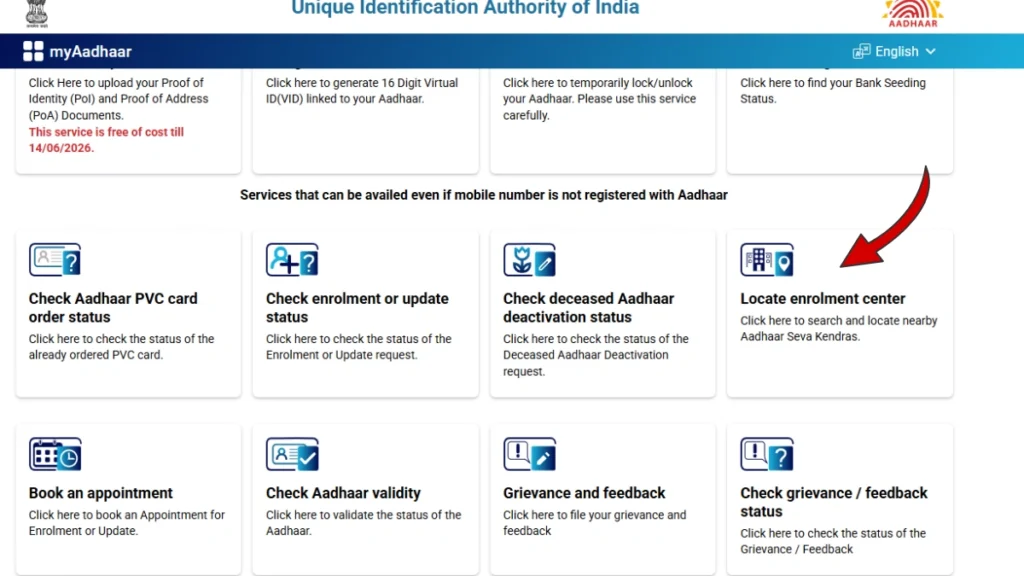
Search for Enrollment Center
- Enter your PIN code, city, or state to search.
- A list of nearby Aadhaar Enrollment Centers will appear with complete address and contact details.
Important Note :You can visit an Aadhaar Enrollment Center to:
- Enroll for a new Aadhaar card
- Update Aadhaar details such as name, address, mobile number, or biometrics
For new enrollment, personal details, supporting documents, and biometric information are required, and an Enrollment ID (EID) is issued.
For updates, documents and biometric verification are completed, and a Update Request Number (URN) is provided.
mAadhaar App – Official Aadhaar Services on Your Smartphone
The mAadhaar App is the official mobile application developed by UIDAI that allows users to access Aadhaar services anytime, anywhere using their smartphone. It provides a secure and convenient way to manage Aadhaar digitally.
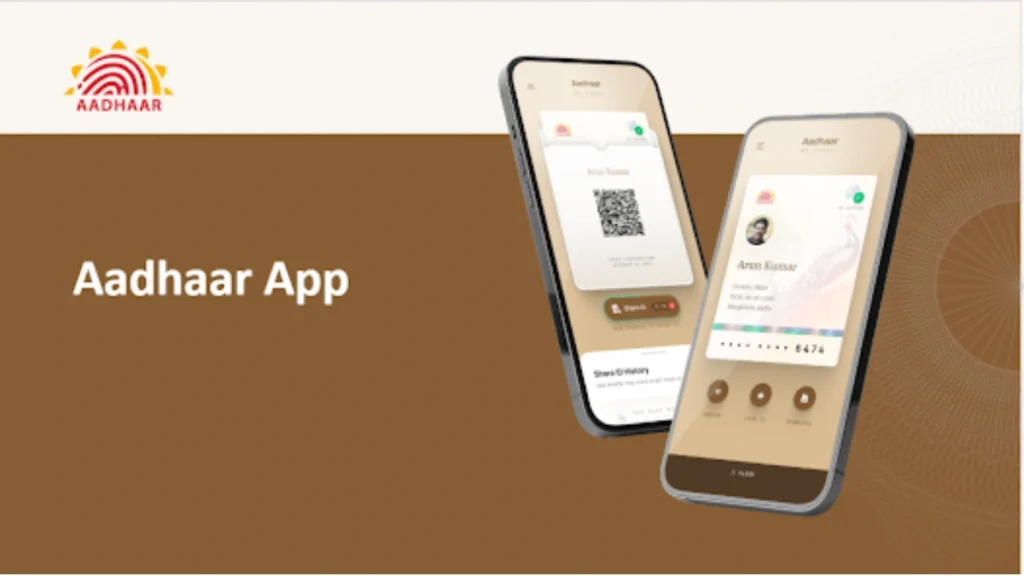
What You Can Do with mAadhaar
Using the mAadhaar app, users can:
- Download Aadhaar card and e-Aadhaar PDF
- Generate Virtual ID (VID) and order Aadhaar PVC Card
- Share Aadhaar QR code and eKYC digitally
- View Aadhaar details and authentication history
- Lock or unlock biometrics for added security
- Update limited details such as address
The app supports OTP and app PIN authentication, ensuring safe access to Aadhaar services.
| Feature | mAadhaar App | New Aadhaar App (UIDAI) |
|---|---|---|
| Purpose | Aadhaar services management | Digital Aadhaar wallet for daily use |
| Aadhaar Download | e-Aadhaar PDF download available | Aadhaar stored digitally for instant access |
| PVC Card Order | Yes | Limited / future integration |
| Virtual ID (VID) | Can generate VID | Not primary focus |
| Login Method | OTP + App PIN | OTP + Face Authentication / Biometrics |
| Family Profiles | Mostly single Aadhaar | Up to 5 Aadhaar profiles on one device |
| QR Code Sharing | Basic QR sharing | Advanced QR with selective data sharing |
| Offline Access | Limited | Aadhaar available offline after setup |
| Security Level | OTP & PIN based | Face ID, biometric lock, privacy controls |
| Best Use Case | Aadhaar services & updates | Secure identity display & verification |
| Replacement | Main Aadhaar service app | Works alongside mAadhaar |
Aadhaar Services – Simple, Secure & Digital
UIDAI provides a wide range of Aadhaar services that help users manage their identity easily and securely. These services are designed to support both online and offline needs, making Aadhaar access simple for everyday use. Key Aadhaar services include:
- Aadhaar Enrollment & Updates: Apply for a new Aadhaar card or update personal details such as name, address, mobile number, and biometrics through authorized centers or online services.
- Digital Aadhaar Access: Download e-Aadhaar, view Aadhaar details online, and use masked Aadhaar for safer sharing.
- Aadhaar PVC Card Service: Order a durable, wallet-size Aadhaar PVC Card online, delivered securely to your registered address.
- Virtual ID (VID) Services: Generate a temporary Virtual ID to protect your Aadhaar number during authentication and verification.
- Aadhaar Authentication & eKYC: Use Aadhaar for secure identity verification across banking, telecom, and government services.
- Security & Privacy Controls: Lock or unlock biometrics, view authentication history, and control how your Aadhaar data is shared.
These Aadhaar services focus on convenience, security, and privacy, ensuring that users can manage their digital identity safely and efficiently in daily life.
Aadhaar and UIDAI: Overview and Latest Updates
Aadhaar is a 12-digit unique identification number issued to residents of India. It is managed by the Unique Identification Authority of India (UIDAI), a government body under the Ministry of Electronics and Information Technology (MeitY).
What Is Aadhaar?
Aadhaar is designed to give every resident a single, reliable identity. It is linked with basic details such as name, date of birth, address, gender, and biometric information like fingerprints and photograph. This helps prevent duplicate identities and makes verification easier.
What Is UIDAI?
UIDAI is the authority responsible for issuing Aadhaar numbers and managing Aadhaar data securely. It ensures that Aadhaar services are accessible, safe, and transparent for citizens.
Why Aadhaar Matters
Aadhaar is widely used for:
- Banking and financial KYC
- Government subsidy and welfare schemes (DBT)
- Mobile SIM verification
- Digital and e-governance services
Latest Aadhaar Updates and Services
UIDAI continues to improve Aadhaar services for user convenience and security. Some key updates and features include:
- Aadhaar PVC Card: A durable, wallet-size Aadhaar card available for online order
- Virtual ID (VID): A temporary ID to protect Aadhaar number privacy
- Masked Aadhaar: Shows only the last 4 digits for safe sharing
- mAadhaar App: Access Aadhaar services on mobile
- Digital Aadhaar Wallet App: Secure Aadhaar storage and QR-based sharing
- Biometric Lock/Unlock: Extra protection against misuse
Important Note: Aadhaar is not proof of citizenship. It is only used as proof of identity and address, as clarified by UIDAI and the Supreme Court of India.
Organizational Structure
The UIDAI operates under the Ministry of Electronics and Information Technology (MeitY) and is headquartered in New Delhi. It is led by a Chairperson and CEO who manage Aadhaar operations nationwide. UIDAI has regional offices across India and works through Aadhaar Seva Kendras and authorized enrollment centers to deliver Aadhaar services to citizens.
- Headquarters: UIDAI is based in New Delhi and has regional offices in major cities across India.
- Leadership: UIDAI is led by a Chairperson and a CEO appointed by the Government of India.
- Operations: Aadhaar services are provided through Aadhaar Seva Kendras, bank/post office centers, and digital platforms like myAadhaar and mAadhaar apps.
- Helpline & Support: Citizens can get help via toll-free number 1947 or email help@uidai.gov.in, available in multiple languages.
Aadhaar Portal – Frequently Asked Questions
- How to download Aadhaar card online?
- You can download your Aadhaar card online from the UIDAI website by entering your Aadhaar number or enrollment ID and verifying with an OTP sent to your registered mobile number.
- How to check Aadhaar linked mobile number?
- You can check whether your mobile number is linked with Aadhaar by using the mobile number verification option available on the UIDAI website.
- How can I update or change my mobile number in Aadhaar?
- To change or update your mobile number, you need to visit the nearest Aadhaar enrollment or Aadhaar Seva Kendra. This service is not available online.
- Can I print my e-Aadhaar card?
- Yes, you can print your e-Aadhaar card. A printed copy of e-Aadhaar is valid and can be used like a normal Aadhaar card.
- What documents are needed for Aadhaar enrollment?
- You need documents for identity proof, address proof, and date of birth proof to enroll for Aadhaar.
- What should I do if I lose my Aadhaar card?
- If you lose your Aadhaar card, you can download your e-Aadhaar online or retrieve your Aadhaar number using your registered mobile number.
- How many digits are there in an Aadhaar number?
- An Aadhaar number has 12 digits.
- What are the three types of Aadhaar card?
- The three types of Aadhaar cards are Aadhaar Letter, e-Aadhaar, and Masked Aadhaar.
- Who is eligible for Aadhaar?
- Any resident of India, including children, is eligible to apply for Aadhaar.
- Is e-Aadhaar valid everywhere?
- Yes, e-Aadhaar is valid everywhere, including airports, banks, and government offices.