Aadhaar Card Status:- The Aadhaar card is a unique 12-digit identification number issued by the Unique Identification Authority of India (UIDAI). It is an essential document for availing government schemes, banking services, subsidies, and identity verification.
If you have recently applied for a new Aadhaar card or requested an update, checking the Aadhaar card status helps you track progress and avoid delays.
This guide explains the importance, process, and official methods to check Aadhaar enrolment and update status easily.
Aadhaar Enrolment & Update Status
Check Aadhaar enrolment status, update status and track your Aadhaar application online.
Aadhaar Enrolment & Update Status – Overview
UIDAI allows residents to track:
- Aadhaar enrolment status (new Aadhaar application)
- Aadhaar update status (name, address, DOB, mobile, biometrics)
You can check your status through:
- UIDAI website (My Aadhaar portal)
- mAadhaar mobile app
- UMANG app
- Toll-free helpline (1947)
All services are free and secure.
Aadhaar Enrolment Status
After enrolling at an Aadhaar Seva Kendra (ASK) or Permanent Enrolment Centre (PEC), you receive an acknowledgement slip containing a 28-digit Enrolment ID (EID).
Checking enrolment status helps you confirm:
- Whether Aadhaar has been generated
- Whether verification is still in progress
⏳ Processing time: Usually 10 to 90 days, depending on verification.
Aadhaar Update Status
If you have requested any Aadhaar update such as:
- Name correction
- Address update
- Mobile number change
- Date of Birth update
- Biometric update
You receive an Update Request Number (URN) or Service Request Number (SRN).
Checking Aadhaar card update status confirms whether your changes are:
- Under processing
- Approved
- Completed
⏳ Update time: Generally 10 to 30 days.
Prerequisites to Check Aadhaar Status
Keep any one of the following details ready:
- Enrolment ID (EID): 28-digit number from acknowledgement slip
- Update Request Number (URN/SRN): For Aadhaar updates
- Aadhaar Number: 12-digit Aadhaar (in some cases)
- Registered Mobile Number: For OTP verification
- Acknowledgement Slip: For reference
If you lose your EID or URN, UIDAI provides recovery options (explained below).
Methods to Check Aadhaar Enrolment & Update Status
1. Check Aadhaar Status via UIDAI Website (My Aadhaar Portal)
The My Aadhaar portal is the official and most reliable method.
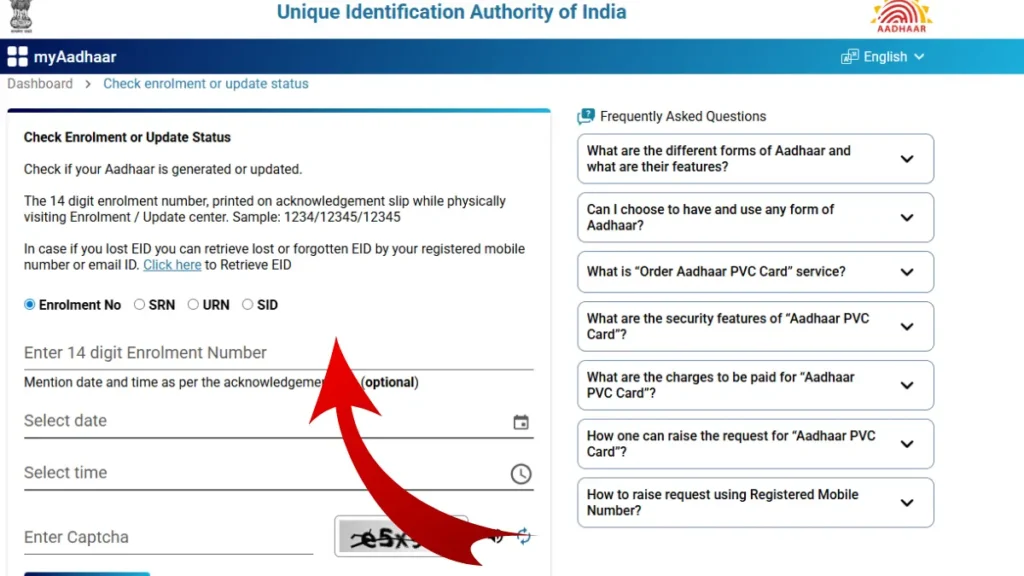
Steps:
- Visit the UIDAI My Aadhaar portal
- Click on “Check Enrolment or Update Status”
- Enter your 28-digit EID / URN / SRN / SID
- Enter the captcha code
- Click Submit
Your Aadhaar status will appear as:
- Under Processing
- Aadhaar Generated
Check Aadhaar Status Using mAadhaar App
The mAadhaar app offers a convenient mobile option.
Steps:
- Download the mAadhaar app from Google Play Store or App Store
- Open the app and select your preferred language
- Tap on “Enrolment & Update Status”
- Enter your EID and captcha
- Click Check Status
If Aadhaar is generated, you can:
- Log in using OTP or TOTP
- Download e-Aadhaar PDF
Check Aadhaar Status via UMANG App
UMANG integrates Aadhaar services with other government platforms.
Steps:
- Install UMANG app or visit web.umang.gov.in
- Register or log in using OTP
- Go to All Services → Aadhaar
- Select Check Enrolment & Update Status
- Enter EID and captcha
- Submit to view Aadhaar status
Check Aadhaar Status via Toll-Free Number
You can also check Aadhaar enrolment status through UIDAI’s helpline.
📞 Dial: 1947 (from registered mobile number)
IVR Process:
- Press 1 for Aadhaar services
- Choose enrolment/update status
- Enter your Enrolment ID (EID)
The system will announce your current Aadhaar status.
How to Retrieve Lost EID or URN
If you have misplaced your acknowledgement slip:
Steps:
- Visit UIDAI My Aadhaar portal
- Click Retrieve EID / Aadhaar Number
- Enter your name, registered mobile/email, and captcha
- Verify OTP
Your EID or Aadhaar number will be sent via SMS/email.
UIDAI Helpline Support
If you face any issues while checking Aadhaar status:
📞 UIDAI Toll-Free Number: 1947
🕒 IVRS: 24×7
👤 Agent Support: 7 AM – 11 PM (Monday to Saturday)
FAQs – Aadhaar Card Status
How can I check my Aadhaar card status online?
You can check Aadhaar status online using your Enrolment ID (EID) or SRN on the UIDAI My Aadhaar portal.
How to check Aadhaar status without Enrolment ID?
You can retrieve your EID using your registered mobile number and OTP verification on the UIDAI website.
How long does Aadhaar generation take?
Aadhaar is usually generated within 5–15 working days, but in some cases, it may take up to 90 days.